New in Craft CMS 1.3
The community has been asking Pixel & Tonic to bring Matrix, their well-known ExpressionEngine plugin, into Craft for a long time. Now, it's finally here.
This article is over 12 years old. Features and approaches described here may have changed since.
The idea wasn't just copied over; it was improved in a meaningful way. Each Matrix field can have different block types, each with its own set of fields. The best part is that Matrix isn't a paid plugin as first planned. It's now included in Craft 1.3 core.
The road to Matrix
Matrix was the most requested feature since the public beta began. At first, Pixel & Tonic said it would probably be a commercial plugin. This made many developers hesitate to use Craft for client projects.
So, it's a big surprise that Matrix is now free and built into the core. Pixel & Tonic said the integration only took a few weeks, with most of the work focused on the UI. You can really see the results.
Matrix
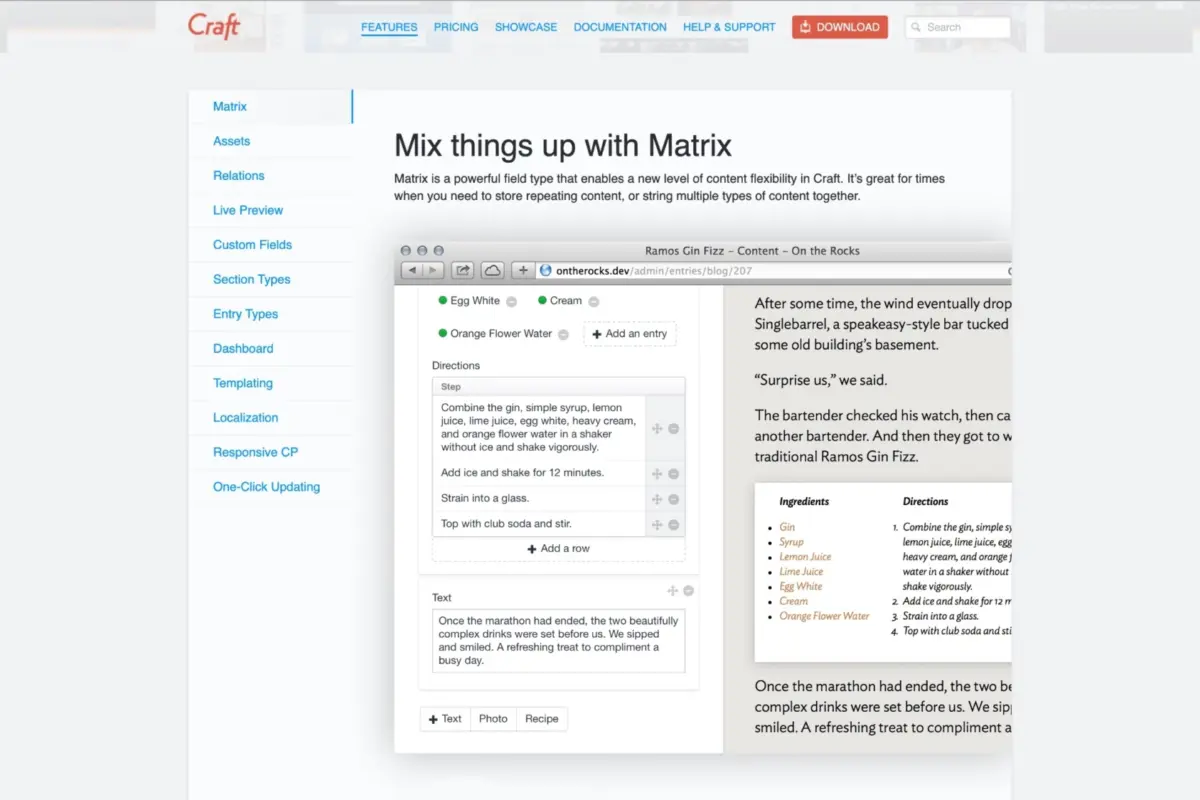
Matrix fields are made up of content blocks you can define however you like. Each block can have as many fields as you need, based on the content type. You can add, reorder, or delete blocks in the field whenever you want.
This lets you build articles similar to those on The Verge, mixing text, quotes, galleries, and tweets in any order. You could also run a food blog where recipes and regular posts are separate block types.
Like all other field types, Matrix fields can be attached to entries, assets, tags, users, or globals. Each Matrix field has its own content table in the database, but it's stored the same way as other field types.
Matrix vs. WordPress shortcodes
WordPress developers will recognize the shortcode approach to flexible content. The problem is that shortcodes put the burden on editors: wrong bracket, wrong parameter name, and the whole thing breaks. And you won't know until after saving.
Craft takes a different approach. Editors just click to pick a block type, fill in the fields, and drag and drop blocks to reorder them. There's no markup or syntax to worry about, so mistakes are much less likely. Developers set up the markup for each block type once in the template and keep full control over the output.
Matrix in templates
The new switch Twig tag, added in 1.3, works well with Matrix. Instead of using lots of nested if statements, you can handle block types in a much cleaner way:
    {% for block in entry.matrixField %}
    {% switch block.type %}
        {% case "text" %}
            {{ block.text }}
        {% case "quote" %}
            <blockquote>{{ block.quote }}</blockquote>
        {% case "image" %}
            {{ block.image.first().getImg() }}
    {% endswitch %}
{% endfor %}
This example is just to show the basics. How you set it up will depend on your own block types and fields.
More in 1.3
Another new feature is the Lightswitch field type, which is a simple on/off toggle for boolean values. You can now also use fields as sorting and filtering options when fetching elements, making element queries much more flexible.
My take
Having Matrix free and built into the core instead of as a paid plugin makes this release even better. For me, it was the missing piece that made Craft CMS a real option for client projects.
When entry types and section types were added in September, I thought, "Not much is missing now." With version 1.3, I can finally recommend Craft with confidence.

Web Developer