New in Craft CMS 1.2
Craft 1.2 has been released with two major new features and around 100 improvements. The introduction of Singles and Structures fundamentally changes how content is managed in Craft.
This article is over 13 years old. Features and approaches described here may have changed since.
Section types
Until now, Craft only had Channels, entries sorted automatically by date. Anyone who wanted to change the order had to manually adjust the entry dates. Craft 1.2 solves this with two new section types.
Singles
Pixel & Tonic previously recommended using Globals for unique content pages, such as the homepage. For me, that was always just a workaround, and apparently, the Craft team has come to the same conclusion.
Singles offer two clear advantages. First, it never made semantic sense to manage a unique page under "Globals". More importantly, Singles supports live previews, making content management considerably easier. From version 1.2, the installer automatically creates a Single for the homepage instead of a Global Set.
Structures
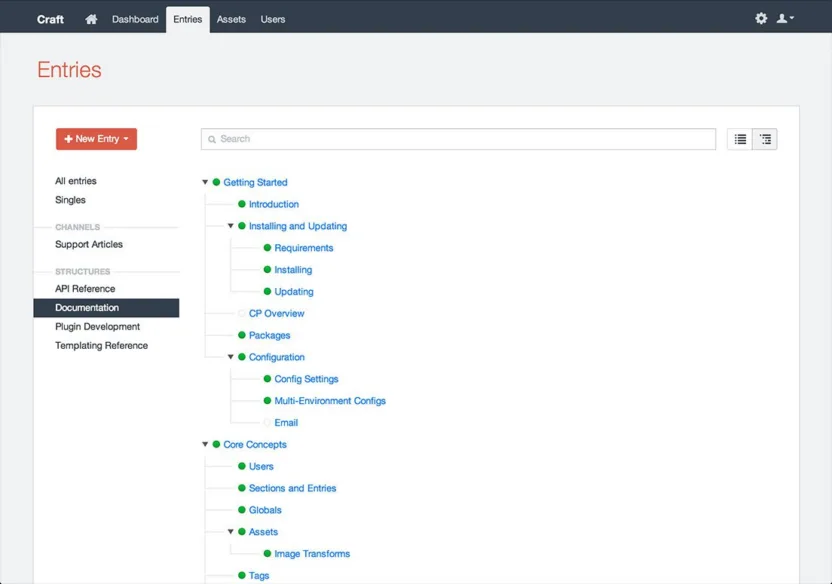
Structures are entries over which you have full control of the order. Multi-level structures can be arranged in a tree, the URL format is customizable, and nesting can be reflected in the URL if needed.
Version 1.2 adds several new template functions for working with Structures. getAncestors(), getDescendants(), getChildren(), and getSiblings() cover most navigation needs, and the new % nav % tag takes care of rendering the tree itself.
Entry types
Entries can now contain different types. A blog section, for example, could include both articles and links, as Daring Fireball does. Each entry type has its own set of fields, selectable above the entry.
Previously, all fields had to be included within a single entry, and the frontend had to output the right ones. Those days are over.
Element reference tags
Version 1.2 introduces element reference tags. Entries and assets can now be linked by reference in Rich Text fields, for example, {entry:blog/my-article} or {asset:100}. The advantage: if an entry's URL changes, any links to it in Rich Text fields update automatically.
Control panel
The entire control panel has been redesigned. Settings and Updates are now displayed as icons on the right side of the navigation. Updates only appear when an update is actually available. User photos are now visible in the user index and selection modals.
My take
With 1.2, content modelling in Craft gets a lot more flexible. Singles finally solve the homepage problem, since Globals always felt like a hack for that use case. They're also handy for pages like legal notices or privacy policies, where you'd rather editors couldn't delete them at all.
Structures open up new possibilities, too. The first thing most developers will reach for is navigation, where menu items can be reordered via drag-and-drop. For hierarchical content such as documentation, Structures work well too, and Pixel & Tonic uses them for the official Craft documentation.
Matrix is still missing. Without it, Craft is a challenge for complex client projects. But 1.2 shows the CMS is growing in the right direction.

Web Developer