New in Craft CMS 5.9
Craft 5.9 came out yesterday. Two or three of the additions will change how I set up the control panel on new projects.

Custom Entry Index Pages
This is the one I care about most, partly for selfish reasons. CraftEntries runs on Craft, and for years the Podcast section sat buried under Entries alongside everything else.
Those of us coming from WordPress know what a cluttered sidebar looks like. Custom post types, plugin settings, media, everything fighting for attention. Craft's approach of keeping everything under Entries was a deliberate contrast to that, and for the most part it worked. "All your content lives in Entries" was a reasonable thing to tell a client.
But you start counting the extra clicks. Why go Entries → Podcast just to add an episode? Why Entries → Links when Links could sit in the sidebar directly? With 5.9, it can. I started with Podcast and Articles here on CraftEntries and figured that would be enough. By the time I was done, Links and Crafters had moved out of Entries too. The old structure still works if you prefer it, but now you choose.
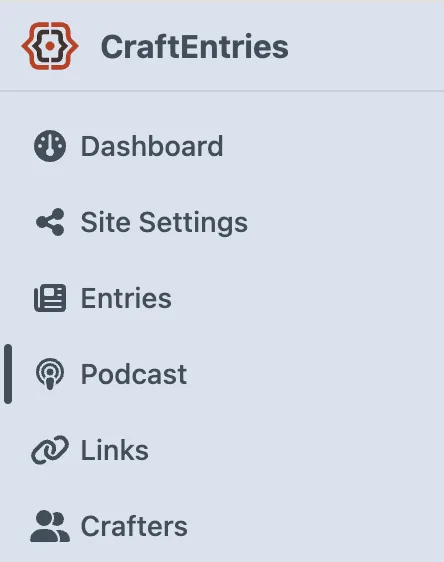
Last July, when 5.8 made the Entries sidebar headings collapsible, I wrote that Pixel & Tonic clearly saw the problem and were looking at the right place without having the full answer yet. This is the full answer.
Inline List View for Relational Fields
Relational fields now offer an "Inline list" view mode that displays selected items side-by-side rather than stacking them. If you've used Tags fields, it's the same compact layout. The old list view remains available, as do cards and card grid.
Matrix Field Improvements
Matrix fields with grouped entry types now show a separate Add button per group when the viewport is wide enough, so instead of a single menu listing everything, editors see only the groups they care about.
5.8 gave Matrix fields expand and collapse for the whole field. Now the actions apply to whatever you've selected. In Blocks view, selected blocks can be expanded or collapsed, copied, duplicated, and deleted. In Cards view, copy, duplicate, and delete are available.
Element-Based Editability Conditions
Editability conditions arrived in 5.7, and until now they worked on user permissions: this group can edit the field, that group sees it read-only. I've had that running on a client's technical specification tables since April, and it does what it should.
5.9 lets you base the condition on the entry itself. An end date field that only becomes editable once a start date is set, for instance. That's the cleaner alternative to showing and hiding fields through visibility conditions, which makes the form jump around as people fill it in. All non-editable fields now also get a visible "Read Only" badge, so the state is always clear.
Conclusion
The Custom Entry Index Pages are the kind of change that reaches every project I build from here on. The next client handover will be noticeably shorter.
The release also includes several security fixes, among them three high-severity vulnerabilities. Update sooner rather than later. Check the full changelog; there's more than I covered.

Web Developer